top of page

avatar hero image
avatar hero image
1/1
OVERVIEW
A project that involved installing an AI chatbot within malls and tourism hotspots to help clients with user engagement as well as streamline tasks like aiding users to desired locations or answer sought-out information.
My Role
UX/UI Designer
Visual Designer
Tools
Figma
Adobe Photoshop
Involvement
Sketching, Research, and Wireframing
Date
July 2024 - Ongoing
RESEARCH AND GOALS
Research was done on current trends and competitors.
COMPETITOR AVATARS:
-
humanlike avatars
-
suggested asks/questions
-
face to torso visibility
-
chat function
-
brightness
.png)


KOTOZNA AVATAR:
It was a bit different from our initial avatar chatbot, which was created for a mobile experience.

Humanoid but not human avatar; which might intimidate users and appear "unrelatable".
Much darker interface; while it might look more "futuristic", it also looks cold and unrelatable.
Chat function is available, but no suggested search.
Compared to our competitors our avatar right now is unrelatable, cold, and basic in functions.
We need to:
-
Make it more approachable
-
Make it brighter and warmer
-
Give more user-friendly functions: visible instructions, suggestions, chat log history, etc.
REITERATIONS AND FEATURES
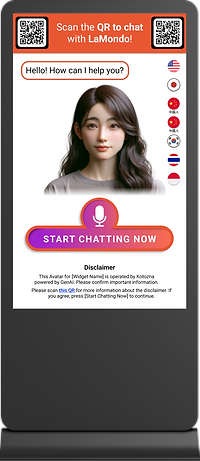
The language setting was changed, as associating a language to a single country could lack sensitivity to users; the language option was not common in competitors; an advantage for us.
The start chatting button needed to be bold/different as we wanted something that would capture users' attention with novelty.
We had to keep in mind of accessibility with reach and also colors for users.
FIRST DRAFT
FINAL DRAFT

To increase user comfort we included an instructions tab, keeping in mind of utilizing the space efficently.
Eliminating as much clutter as possible, but certain instructions are necessary such as the location of the microphone- therefore we attached both tabs (instructions and mic location) together.
Pressing on the tab pulls out the instructions.

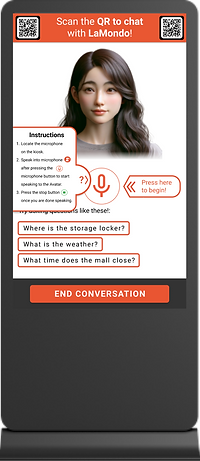
QR codes will be displayed for passing users who wish to interact with the avatar by mobile or if avatar is already occupied with another user.
Disclaimer pops up as a QR code if users click on link provided in bottom fineprint.
"Tap here to start" button is made visible to encourage users to proceed.

A mobile formatting was done for users who scan the QR code provided on the kiosk screen.

FLOWS
General flow of when user speaks to avatar and ignores suggestion.
It also show the flow for Disclaimer QR, and the ratings provided at the end by the avatar.

Click on image to enlarge.
Flow for how when a user chooses sample question and also how text will look with QRs and if the conversation goes beyond screen length.

Click on image to enlarge.
Flow for how a user would receive directions.

Click on image to enlarge.
Flow for when user picks chat log history, and starts a new chat via mobile.

Click on image to enlarge.
IMPLEMENTATION
The avatar kiosk is currently being used at Jewel Changi Airport in Singapore.
_edited.jpg)
TAKEAWAYS

Avatar
To maximize text space we are considering to have the avatar full-bodied and to the left of the screen.
Multiple languages
A client may want to have more than the 7 languages presented; a flow will have to be made for such consideration.
Internal tool
The next steps involve iterating and working with internal tools users to create tool for avatar installment/options.
More about that here!
bottom of page